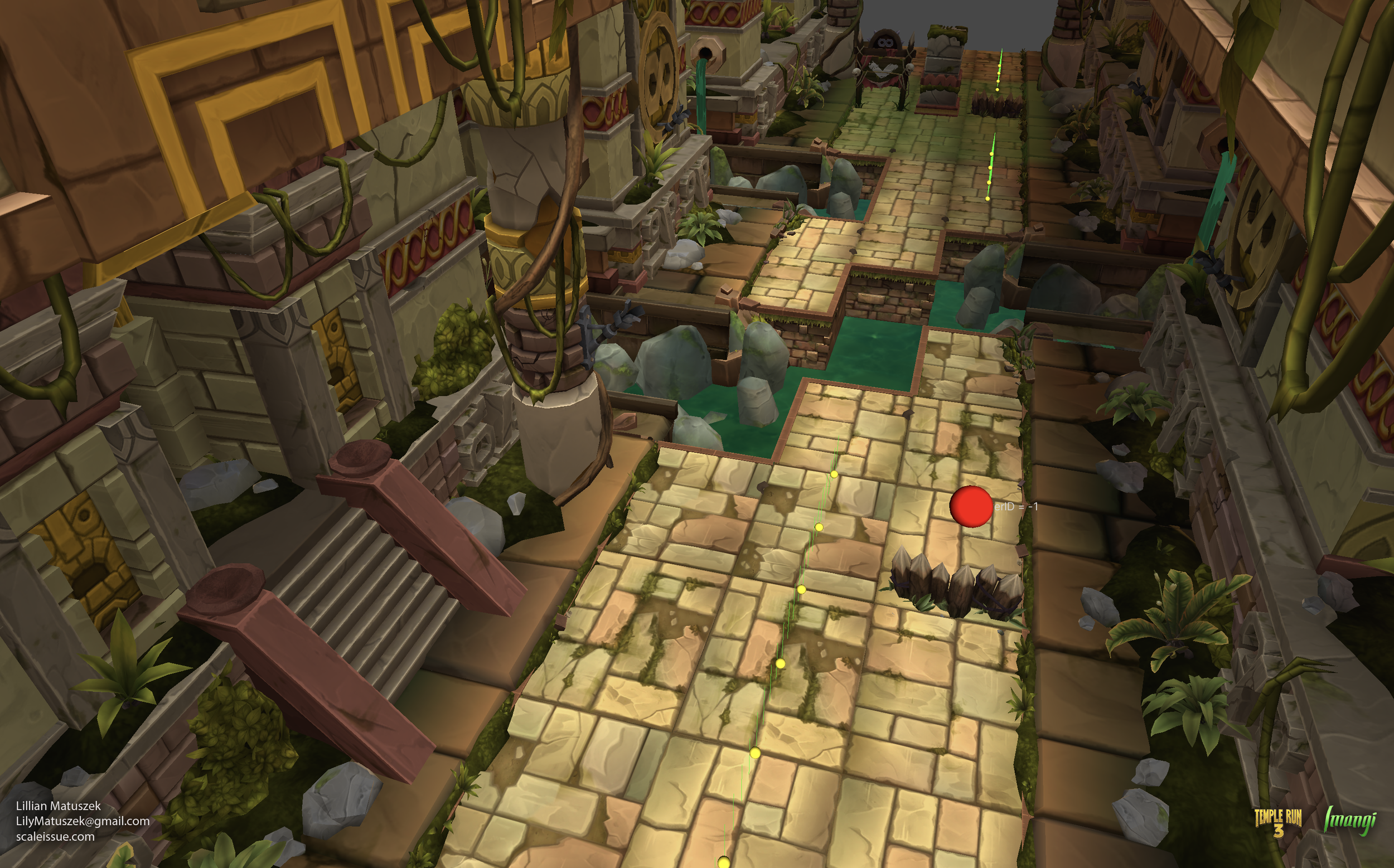
Track System
I designed and maintained the art systems used by the Track System for Temple Run: Legends and Temple Run 3. These defined how all of the environment art and gameplay elements, including obstacles, pickups, and enemies, appeared during gameplay. The system was the culmination of years of artist, designer, and engineer work, resulting in a tool capable of producing highly-variable, optimized environments across multiple, simultaneous projects.
What Did I Do: System & pipeline design, documentation & planning, knowledge transfer to external teams, environment art, environment animations, and world building for Temple Run: Legends and Temple Run 3, VFX, shaders, code for system extensions, optimization
What I Didn’t Do: All Environment Art (collaboration with external co-developers), characters and character animations, code for main track system
Background
I worked on Temple Run 2 for several years prior to moving onto future projects at Imangi, which would eventually include Temple Run: Legends and Temple Run 3. One of the challenges the team faced with Temple Run 2 was combining art and design when building each new map or map skin. Over my years working on TR2, I set guidelines to make the TR2 art pipeline manageable and repeatable, but due to limitations in how the track worked in that game, the design team remained limited in their ability to tweak difficulty or create preset experiences for the player.
Moving onto future infinite runner games, there was a major question that the team needed to solve: How do you create track system with repeating environments that feels natural, can seamlessly blend from one biome to another without loading screens, parallelizes art and design, and creates fun gameplay? We had our work cut out for us.
From the art side, there were several main goals I knew we needed to achieve:
-
Temple Run 2 presented the challenge that the original track pieces were baked into single object meshes for optimization, but every track piece took up space in memory and required external editing to change or optimize. I changed this with time and created template environments to use as building blocks for the environment. This became the foundation for the new track system.
To start, I broke the track down into core parts:
The track surface, where the player runs
The gutter, or the sides of the track that contain the track surface
The out-of-bounds, or non-playable area which serves as the surrounding environment
Obstacles, which sit on the track surface and can harm the player
Gaps; the absence of track as a hazard.
Each of these parts has a subset of variants, be it in width, height, length, or some other measurement. But, each of them serves a gameplay or visual purpose in every environment.
To create reuse, we created building blocks for these parts which were used to create track segments. Since the segments were now a sum of all of their parts, design could build them how they wanted with a level-design focused approach. -
Every game has a limit on the amount of art it has, whether its due to budget, platform, or time. The track system needed to create a believable environment which felt grounded in reality and provided a sense of exploration. My guiding principle on this was that even though the a track segments may inevitably repeat, the player shouldn’t see the same art in back-to-back segments.
To accomplish this, I needed a system that allowed non-destructive layering of assets. This allowed not only for the randomization of appearances, but also for combining two separate track themes into one by creating limited asset palettes.
-
The track needed to provide challenges for the player. We didn’t always know what these challenges were going to be, so the system needed to be scalable so artists or designers could prototype new track parts without blocking each other.
From the start, we decoupled the final art from the track parts so that design could place parts with greybox representations. This allowed design to work independently of art when building track segments. Final art would automatically populate the track segments at runtime based on a theme.
Gameplay elements were templatized. A Jump obstacle would always be a specific size, no matter how it was themed to appear. By providing these guidelines, it removed the guesswork from the process and created a clear chain of tasks for each new element. -
Perhaps the biggest challenge of all was to ensure that the games remained performant and ran smoothly on all sorts of mobile devices. The games targeted extremely low-end Android phones at 30 FPS, while mid and high spec devices maintained a 60 FPS target. Achieving these numbers required architecting systems that wouldn’t cause hitching or frame rate decreases and implementing guidelines and validation tools to ensure the games met their targets.
As part of the development of the system, I set hard limits and expectations for art going into the system to ensure we could reach these goals. I also worked on tools to support low-end performance and decrease loading times. -
Exploration is a core tenet of Temple Run games. It should feel like the player is moving through a believable environment. This meant running into temples, along beaches, across platforms in the sky, or jumping on the backs of crocodiles while crossing a river.
Every environment is built off the same core building blocks, but the world around the player should change. Beyond simple randomization or asset placement, each part of the environment needed to be independently styled to give the impression it came from a different biome. For the player, a run might start in the swamp, but it should end somewhere different and provide them with a sense that they have been somewhere.
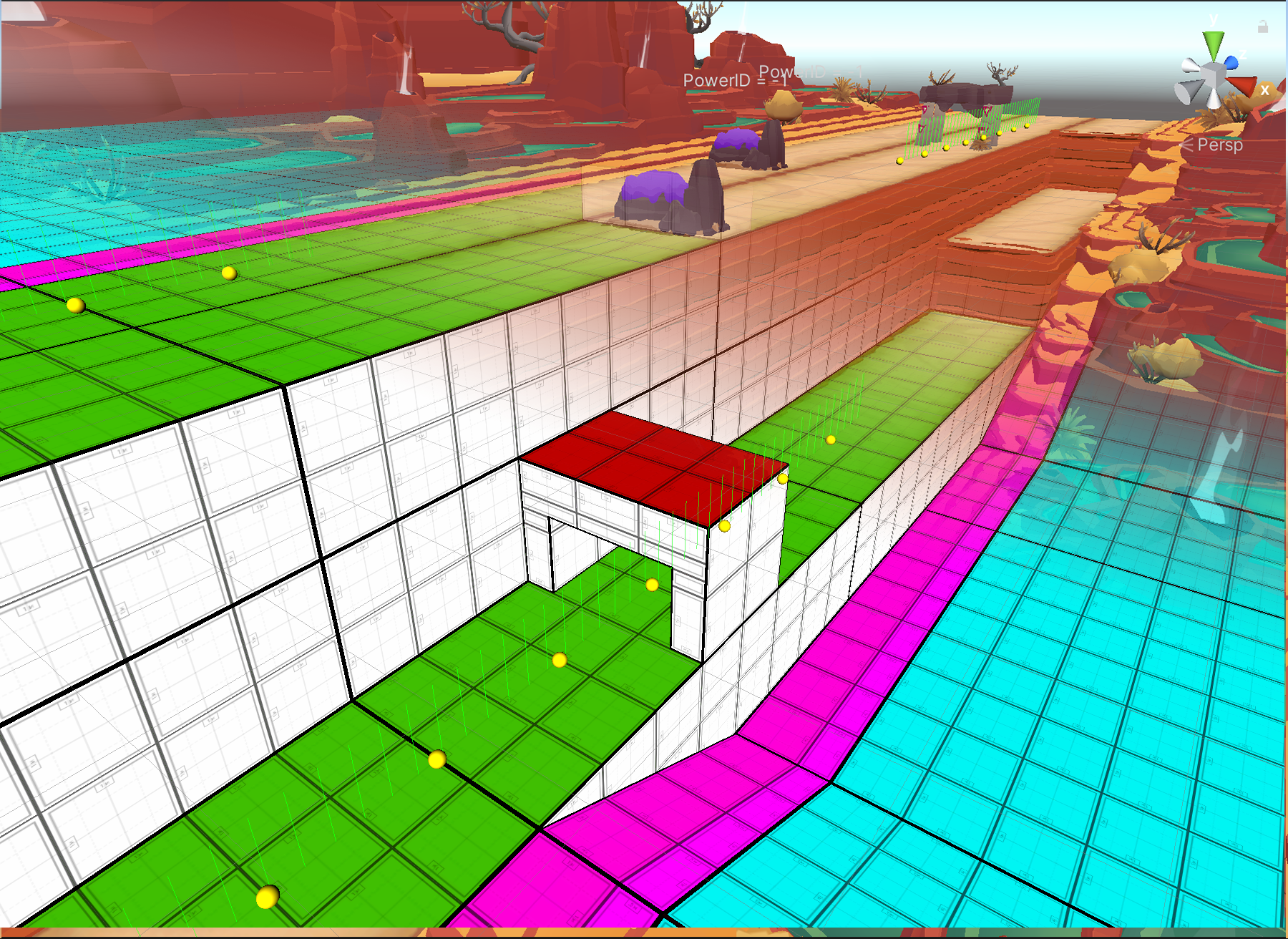
Track Styling Overview
The styling system is what replaced the greybox track art used by segment blueprints with final, themed art. When the track activates a Theme, the assets contained in its Styles are displayed and replace their respective track parts. This is done though a tagging system, where each part has a set of tags (short descriptors like ‘Obstacle’ or ‘Flat’ or ‘32m’) used to make this association and ensure the correct asset is shown.
Once multiple parts exist, design creates track blueprints from them, laying out the specific configuration they want represented in game. In editor, our tooling allowed the user to preview any Theme to see what the track would look. This wasn’t just a preview tool; it was a core part of the workflow for putting together new environments. The user populates the prefabs referenced within a Style and can instantly see the results in editor or in game, replacing building blocks with final art. Artists could replace art directly in the preview mode, so there was no guesswork.
To push this further, the system allowed for unique styles based on the left or right side of the track. This cut down on production time by allowing styles to mirror, but also paved the way for layering themes on top of each other using a robust Fallback system. For example, in Temple Run: Legends, the base Tropical zone consists of a beach to the right of the track and jungle to the left of the track. By using implementing a theme fallback system, artists quickly defined additional themes using existing assets. In game, this might change the Tropical zone so the jungle is instead on both sides of the track, or the player is running on a sandbar instead of a beach. With specific, targeted overrides, we created believable variation in the environment without needing to recreate a zone from scratch.
Holiday-themed live ops events for Temple Run games often included visual changes to the maps. In Temple Run 2, each holiday map was its own standalone download, but with the track system for TRL and TR3, we were able to layer holiday changes on top of the existing assets, selectively adding or replacing specific variants to create the same impact. This resulted in significantly less effort needed to implement new holiday events.
Themes and Styles
For art, the system’s primary interaction happens with Theme and Style assets.
Theme asset contain all of the Styles needed for a Biome to display art for all of its parts. Additionally, themes define settings for things like how the Out of Bounds should behave or what lighting theme they use. These assets are referenced by the design team to tell the game what art to use for a specific level or gameplay experience.
Style assets contain information that associates the track parts with art. Track parts, such as for an obstacle, contain all of the collision and gameplay functionality, but the style tells the part what art to replace the visual with. Parts and Styles are linked together by descriptor tags.
Each Style has configurable lists for what assets they should use. At runtime, the part visual is replaced by a styled object. Each styled object has its own list of deco objects. The easiest way to think about this relation is that the styled object prefab is like terrain, and the deco object prefabs are the different, preconfigured sets of objects that can appear on top of that terrain. Each deco object can be further randomized by an internal script.
This system allows scalability. Some obstacles only require a single styled object to maintain readability, while some Out of Bounds might require three or four variations to achieve visual randomness based on how frequently that part appears.
Motifs
Each track segment supported multiple gutter and out of bounds configurations called a Motif. These were used by both design and art to define the appearance of the Out-of-Bounds, for example, whether the Out-of-Bounds is hilly or flat in appearance. Motif tags were assigned to Themes, which would tell the segment blueprint what configuration it should use to match the art. These existed because certain motifs work with elevation outside of the track to create the feeling of hills and valleys, while other were required to follow the track as close as possible to avoid art issues.
Additionally, the user could specify different motifs for each side of the track. In the example of the Tropical theme from Temple Run: Legends, the Jungle theme used a Hilly motif, while the Beach required a flat, Open motif. When combined, the Jungle side of the track would continue to have elevation changes, while the Beach would remain flat. This allowed for complex theme configurations where the track was asymmetrical in both theme and elevation.
Closed Motif are used for interior spaces with ceilings and side walls
Mostly Open motifs have terrain on the sides with hilly elevation
Mostly Closed motifs have high side walls, but no ceiling.
Open motifs have no solid out of bounds. Elevation follows the track
Track Surface Voxels
A set of voxels comprised 63 simple but unique meshes. Each voxel represented a specific configuration based on what neighbored it. Each voxel position could have 6 positional neighbors (up, down, left, right, front, back). A secondary system accounted for diagonal edge neighbors and placed connecting column or curb meshes to blend surfaces together when needed.
This image highlights four different voxel shapes. The green voxel has top, bottom, front, and back neighbors, so it displays it left and right walls only. The blue voxel has a left, bottom, and back neighbor, while the red voxel only has bottom and back neighbors. The yellow voxel has front, back, and bottom neighbors
The runnable track area is made of many different parts. Some of them are simple, static meshes representing wooden platforms or ramps. The main surface, however, was made from a set of voxel meshes that allowed designers to configure unique elevation changes and platforming challenges.
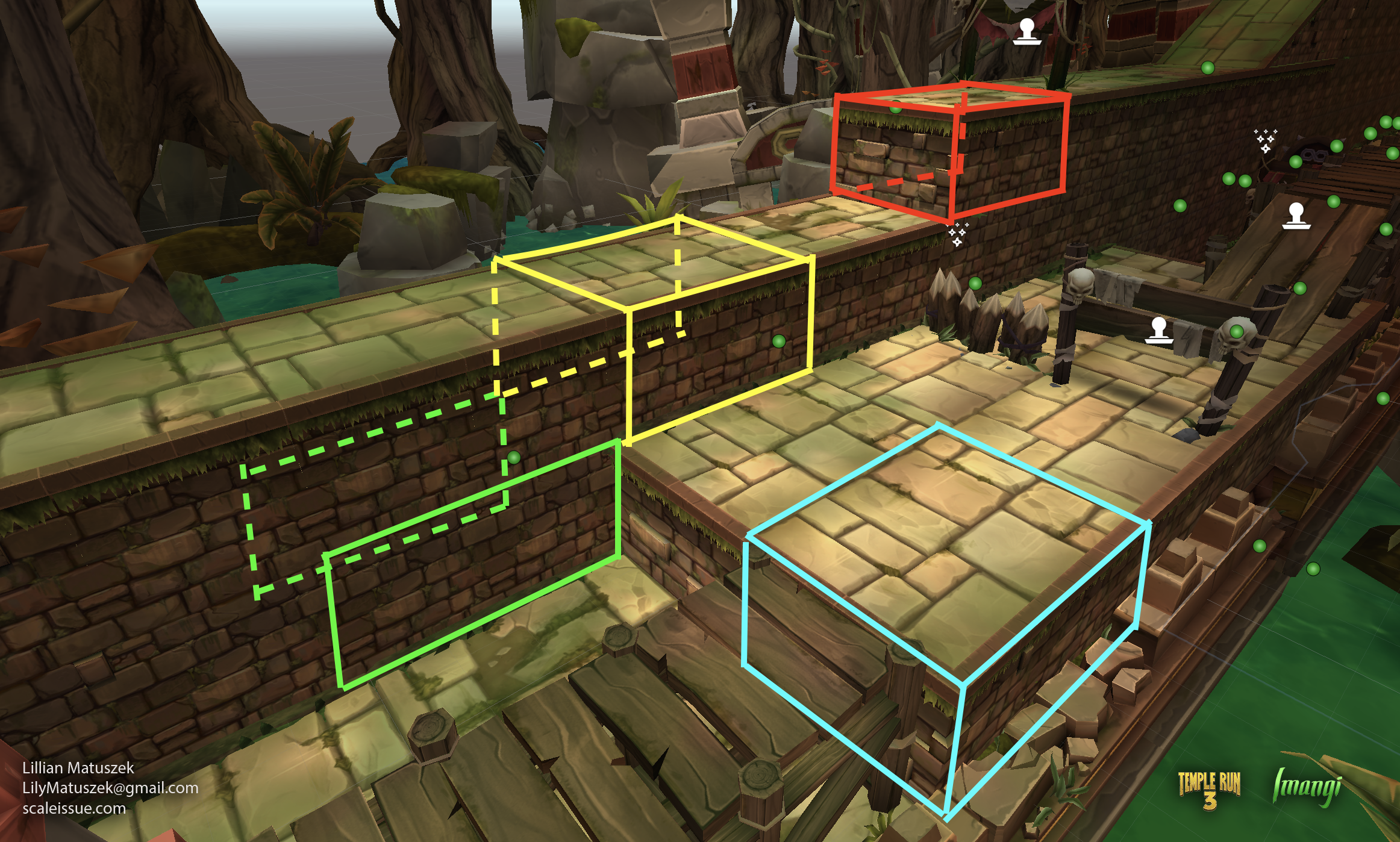
To support the art creation of this huge amount of meshes, I created a geometry node in Blender to preview and generate the voxel meshes. The node output the correct meshes based on their neighboring geometry, and it named and preconfigured the final meshes for export. It helps visualize different configurations, and allows the artist to see how their input meshes will look and tile before they export it into the engine. This eliminated the back and forth between Blender and Unity when tracking down holes or mismatched geometry.
Additional Credits:
Imangi Design & Engineering: For helping me make my crazy ideas reality
Ravegan: Environment Art - Temple Run 3
Frima: Environment Art - Temple Run: Legends