RGBA Mask Shader Node
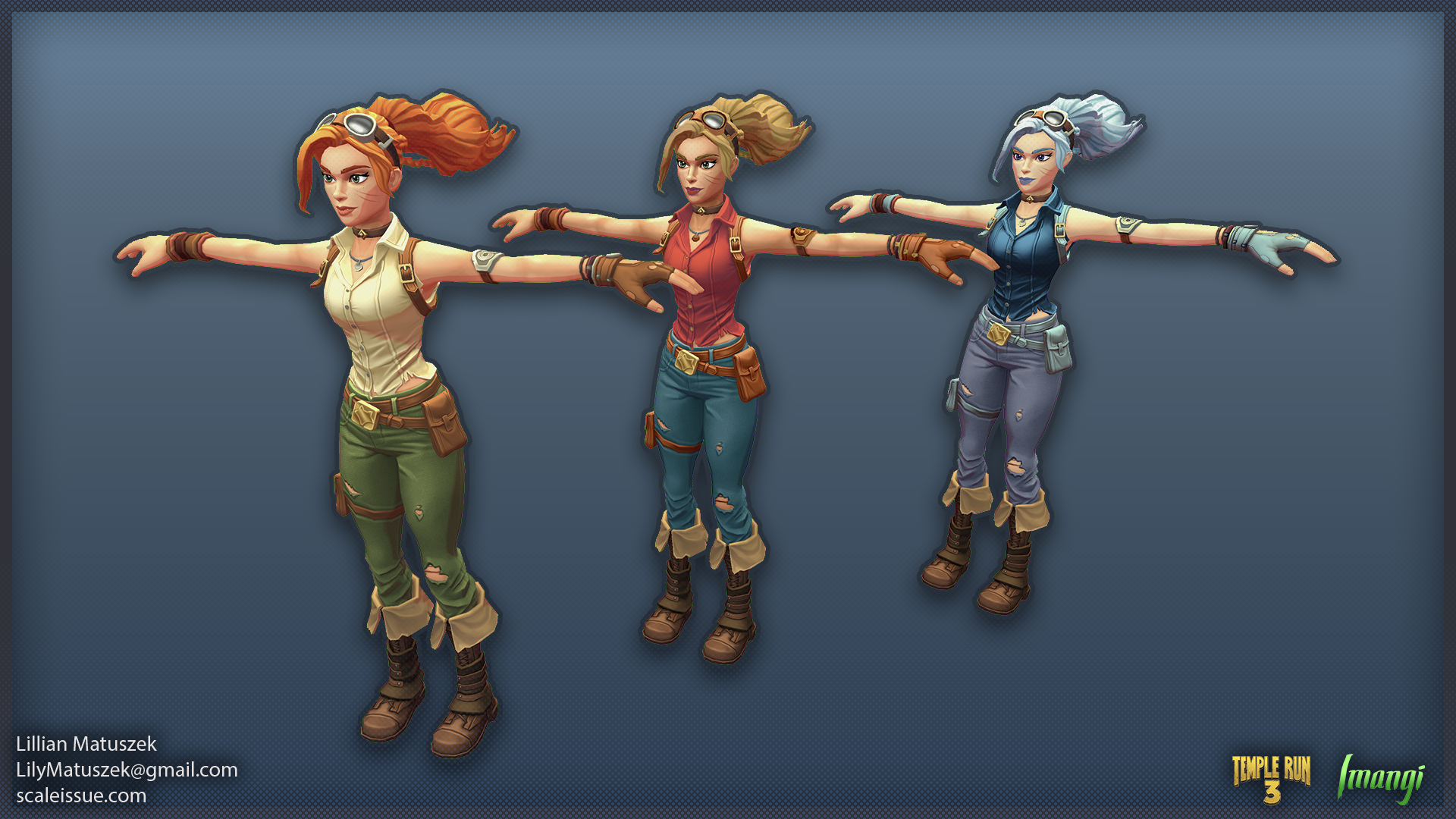
For Temple Run 3, I devised and implemented a RGBA texture masking node to allow characters and pets to have multiple, customizable color palettes. I demonstrated the method to an external team, which involves flagging specific layers inside a character’s Substance Painter file to also apply to the Red, Green, Blue, or Alpha channel of a texture. With this workflow, when the artists exported the character textures, it also exported the mask texture, which is used by the shader to add color to specific areas of the texture. This non-destructive approach allowed for the creation of alternate color palettes without needing to generate additional textures, which saved days of time per character.
What Did I Do: Shader and Pipeline creation, final material creation, game prefab setup
What I DIdn’t Do: Character Art
Pet Shader
The first implementation of this was a simple version for pets. The design team requested multiple variations of pets where each color represented a different gameplay function (economy, score, etc). There were several faced when planning a solution: time, package size, and the ability for the textures to look as good as their hand-colored counterparts. I determined the most efficient solution for the time issue would be to remove the need for multiple rounds of review and feedback, and I instead opted for an in-engine solution where colors were easily adjusted after the external team submitted their work.
Prototyping in Substance Painter, I assigned the existing layers to represent different channel masks. Once the mask layers were created, I then created an export template that took those channels and packed them into a single mask texture.
The main benefit of drawing the mask texture directly from the overlaying texture was that any edits to the texture or pattern are automatically reflected in the mask. I have used this method in other projects to pack different body patterns, but I used this prototype to demonstrate the setup to the character art team.
For pets, the final version allowed the artists to assign 8 different colors.
The packed mask texture is sampled once, then passed through a Split node to extract the R, G, B, and A channels. Each channel represents a region of the pet texture that can be recolored independently. Then, the channels feed into a Lerp nodes as the T input.
A receives the previous layer’s output
B receives the user‑assigned color for that mask
Because each mask channel is a grayscale region, the Lerp blends smoothly between the previous color and the new one. This preserves the original texture’s value structure (shading, patterning, detail) while replacing hue and saturation.
All four masks are stored in a single texture, minimizing memory footprint and avoiding additional texture lookups. This also ensures perfect alignment between the painted texture and the mask.
Because the shader exposes each color as a parameter, artists or designers could adjust palettes live in the editor without re‑exporting textures. This was the primary time‑saver and allowed rapid iteration.
In total, the time saved in asset creation and feedback loops measured in weeks when compared to the first non-masked version of the pets. I could make adjustments in real-time alongside the art director without needing making adjustments in Substance Painter and re-exporting textures. This would also allow the team to add additional color palettes with no additional texture overhead.
Character Shader
Characters had additional requirements from the Art Director to match the quality of hand‑crafted textures. Simple color overlays weren’t sufficient; each region needed its own highlight and shadow response to preserve the painted look. To achieve this, the shader processes each mask channel multiple times rather than relying on a single Lerp pass.
Instead of using the mask channel directly as the T input (as in the pet shader), the character shader uses the grayscale character texture to drive the blends. Each mask channel receives three sequential Lerp operations:
The first Lerp uses the light and dark values of the character’s main texture to establish the base color response.
The second Lerp uses a remapped version of that same texture to generate controlled highlights.
The outputs of these two passes are blended together.
A third Lerp then combines this result with the accumulated output from the other mask channels, creating a layered composite.
This approach preserves the original sculpted detail while allowing each region to have its own controlled highlight, midtone, and shadow behavior. It also ensures that recoloring does not flatten the texture or remove the value structure baked into the artwork.
As with the pet shader, a new material can be authored for a variant color palette by adjusting the exposed color properties. The shader handles all blending internally. Beyond speeding up variant creation, this system was designed to support future goals such as character customization, alternate‑palette reward tracks, or premium skin variations—all without increasing texture memory or production overhead.
Additional Credits:
Ravegan - Character models, textures, and additional shader work